
Edition 3 of The Claude Code Implementation Guide
New Edition 3 (May 2026) with a brand new chapter on company-wide AI, plus updates for the latest innovations – Claude for Small Business, Claude Design, Opus 4.7, Orchestration and Dreaming. A practical, step-by-step guide written by a marketer, for marketers, no coding experience required.
What you will learn
From first install to building your own AI-powered workflows, this guide covers everything you need to get started with Claude Code.
Setup and configuration
Install Claude Code, configure your environment, set permissions, and manage sessions. No terminal experience needed.
Build reusable Skills
Create Skills that automate your repetitive tasks – from meeting notes to LinkedIn posts to client reports. Build once, use forever.
Voice commands
Stop typing, start talking. Learn how to use voice input to give more detailed instructions in less time with Wispr Flow.
Team rollout
A practical framework for getting your team on board – who to start with, how to demonstrate value, and when to scale.
Version control
Save your work, create checkpoints, and use GitHub so you never lose progress. The discipline that makes AI reliable.
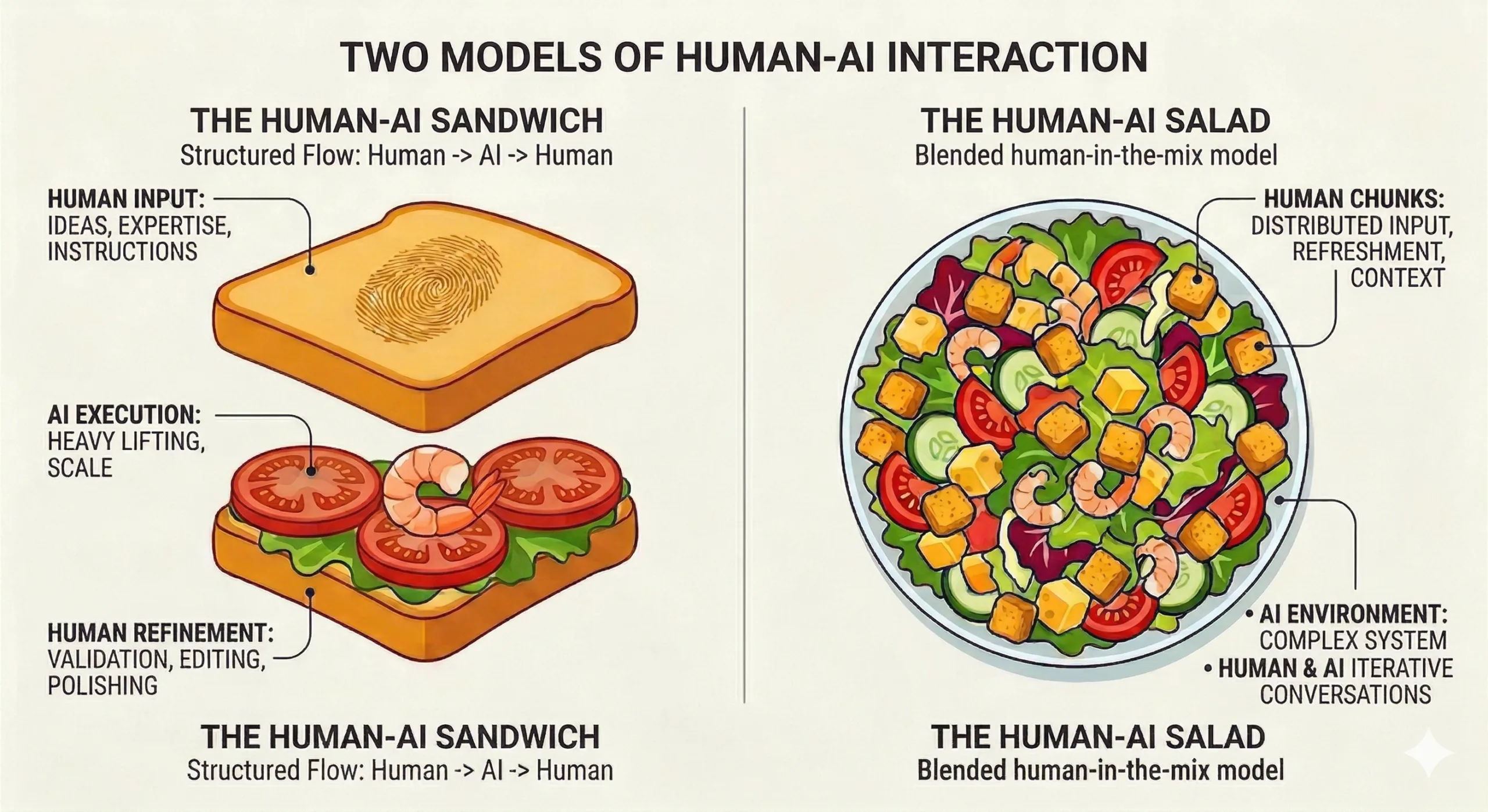
The Human AI Sandwich
The framework for producing quality output every time. Humans at both ends, AI in the middle. Better humans, better sandwiches.
Who is this for?
This guide is written for people who make decisions, manage teams, and want to understand what Claude Code can do for their business.
Marketing Leaders
CMOs, Heads of Marketing, and Marketing Directors who want to understand how AI can transform their output without replacing their expertise.
Agency Owners
Digital agency founders and MDs looking to build AI-powered Skills that scale their delivery, improve consistency, and free up senior time.
Business Managers
Operations managers, project leads, and anyone responsible for making teams more productive. No technical background required.
What makes this guide different
Most guides to Claude Code are written by developers, for other developers. They assume you already know how to code. This one does not. It is written by a CTO who cannot code but who uses Claude Code every day to run a digital marketing agency.
It starts with the questions a business leader actually asks:
- Which version do I download?
- How much will it cost per month?
- What happens if it makes a mistake?
- Who on my team should use it first?
The Tool vs the Setup
Claude Code is the AI, plus the operating system of files, configuration and memory that does the thinking and the work. The ways of accessing it are called Setups (or Wrappers). The guide walks through three main entry points:
- Claude Desktop – looks and feels like a normal app on your laptop
- Cursor or VS Code – sits inside the tools your developers already use, known as a code editor or IDE (Integrated Development Environment)
- Terminal – a simple text window, preferred by developers, that looks old-fashioned but is remarkably powerful once you get going
All three compared side by side in plain English, so you can pick the right one for your team and how hands-on you want to be.
Four Modes for working with AI
Four operating modes, covering every level of human involvement:
- Mode 1: Human Accepts AI Output – ask a single question and use the answer
- Mode 2: The Human-AI Sandwich – you set the brief, Claude drafts, you review
- Mode 3: The Human-AI Salad – you and Claude work interactively, blending ideas
- Mode 4: Full Automation – let it run overnight while you sleep, and check the results in the morning
Everything else you need
Real monthly costs. Practical safety guidance. A day-by-day first week plan. And how to create a single reference file called CLAUDE.md that teaches Claude how your business writes, thinks, and makes decisions.
Every technical term is introduced with a plain English explanation the first time it appears. No prior knowledge assumed. Just the path from “what is this?” to “my team is using it every day to deliver client work”.
Written by a practitioner
Not a coder. A practitioner, a marketer, a business owner who uses Claude Code every single day to run an agency.

Ready to get started?
Download the complete 65-page guide and start implementing Claude Code in your business today.
Download the Guide
Stop watching. Start doing.
Our fortnightly three-hour session for marketers and managers who want to start building with AI. Every session runs in three parts – so whatever your level, there is something for you.
Open Q&A Drop-in
What is new this week, what is in the AI news, and any questions from things you have tried since the last session. Any member can join.
Workshop Track A
A webinar led by one of our expert trainers. Come to upskill and leave with new techniques to put straight into practice.
Show & Tell and AMA Track B
A mics-on, peer-to-peer session. Hosts, guests and members share what they have built and answer each other’s questions.
Plus, take part in a full-day hackathon once a quarter. Topics covered across the year include prompt engineering, AI agents, vibe coding, Claude Code, Skills, MCPs and n8n workflows.
Your first session is free. No experience needed.
Join the Thursday AI Club