How I Used Claude Code to Build Nearly 100 GEO Reports: My Chat with Paris Childress on The GEO Show
The Podcast Summary on Creating GEO Reports With Claude Code
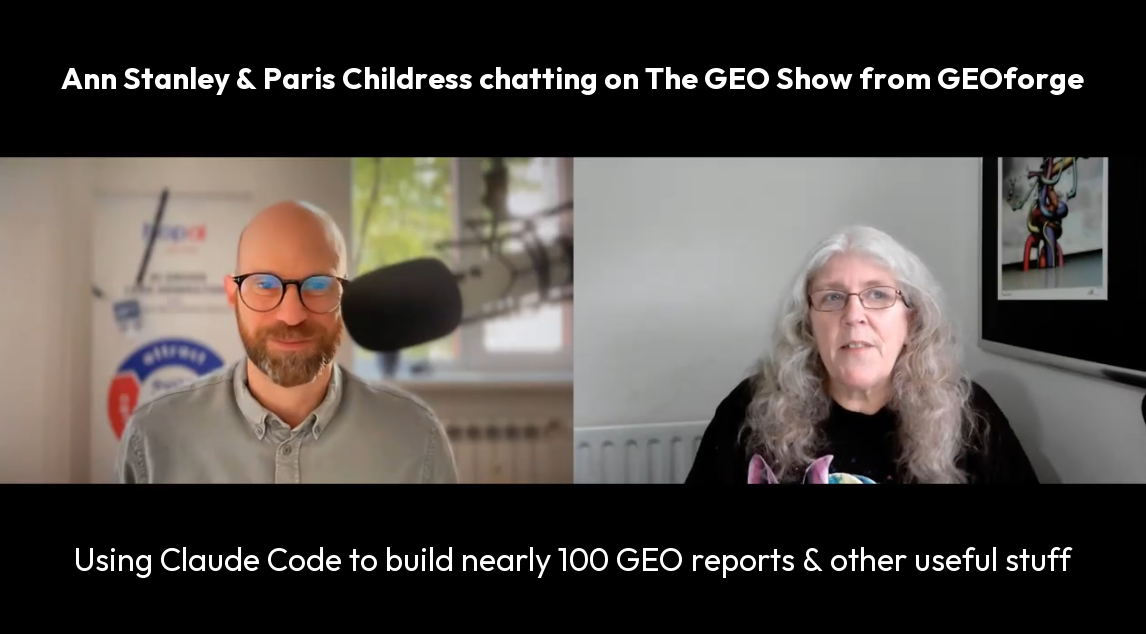
I recently joined Paris Childress on The GEO Show, the podcast from GEOforge, to talk about how I used Claude Code to produce nearly 100 GEO (Generative Engine Optimisation) audit reports in a year, based on a 12-pillar framework.
We covered the pipeline behind the reports (seven AI platforms, Waikay, Ahrefs, Playwright, a custom Chrome extension and a set of Claude Code skills), what the cold outreach achieved, what big brands do and do not understand about AI search, why AI visibility cannot be tracked like keyword rankings, and how Claude Code skills can be linked together into workflows and agents.
Once the pipeline was set up, each report took around 15 to 25 minutes of my time instead of around four hours by hand. The full video is embedded just below the contents.
You can now build your own GEO report inside Armadello when you sign up for the free Armadello trial. Find out how at the end of this post.
Contents
- Watch the full episode
- Why we started producing GEO reports
- How Claude Code built each GEO audit report
- Did the GEO reports bring in work?
- What big brands do not understand about GEO
- Why GEO measurement is so hard
- Claude Code skills: build it and bottle it
- From skills to workflows to AI commanders
- Armadello: why data needs insights and actions
- Get your own GEO report in Armadello
- Learn Claude Code at the Thursday AI Club
- Glossary
Watch the full episode
The full conversation is 46 minutes long and goes into more detail than I could fit here; the timestamps below show where each topic starts in the video, and each topic links to the matching section of this blog.
Ann Stanley talking to Paris Childress on The GEO Show from GEOforge
Where to find each topic in the video
Why we started producing GEO reports using Claude Code
It all started with a cold outreach campaign. I have been talking about AI Search (now more commonly called GEO or Generative Engine Optimisation) at conferences for four years, and I noticed in Google Trends that interest in the subject was growing fast. So, we wanted to test whether businesses would like to know whether they were mentioned in AI search, and what would happen if we offered them a free GEO report.
We built the campaign using Instantly, Clay and Twain , email outreach tools that let you personalise every email with real data about the business you are writing to, and added Semrush data showing how each company’s search visibility compared with a couple of its competitors. About 5% of the people we contacted replied asking for a report.
I could not possibly have produced that many reports on my own. Our SEO team had already built a manual version of the report, so I trained Claude Code on the manual version and taught it to produce the same report with real data in it.
How Claude Code (and I) built each GEO audit report
Claude Code is Anthropic’s AI assistant that runs on your own computer, either in the Claude desktop app or inside an editor such as Cursor or VS Code. Unlike a normal chat, it can read and write files on your machine, run Python scripts and connect to other software through APIs (Application Programming Interfaces, the way one piece of software talks to another), which is what made a report pipeline like this possible.
What went into each report: our own audit as an example
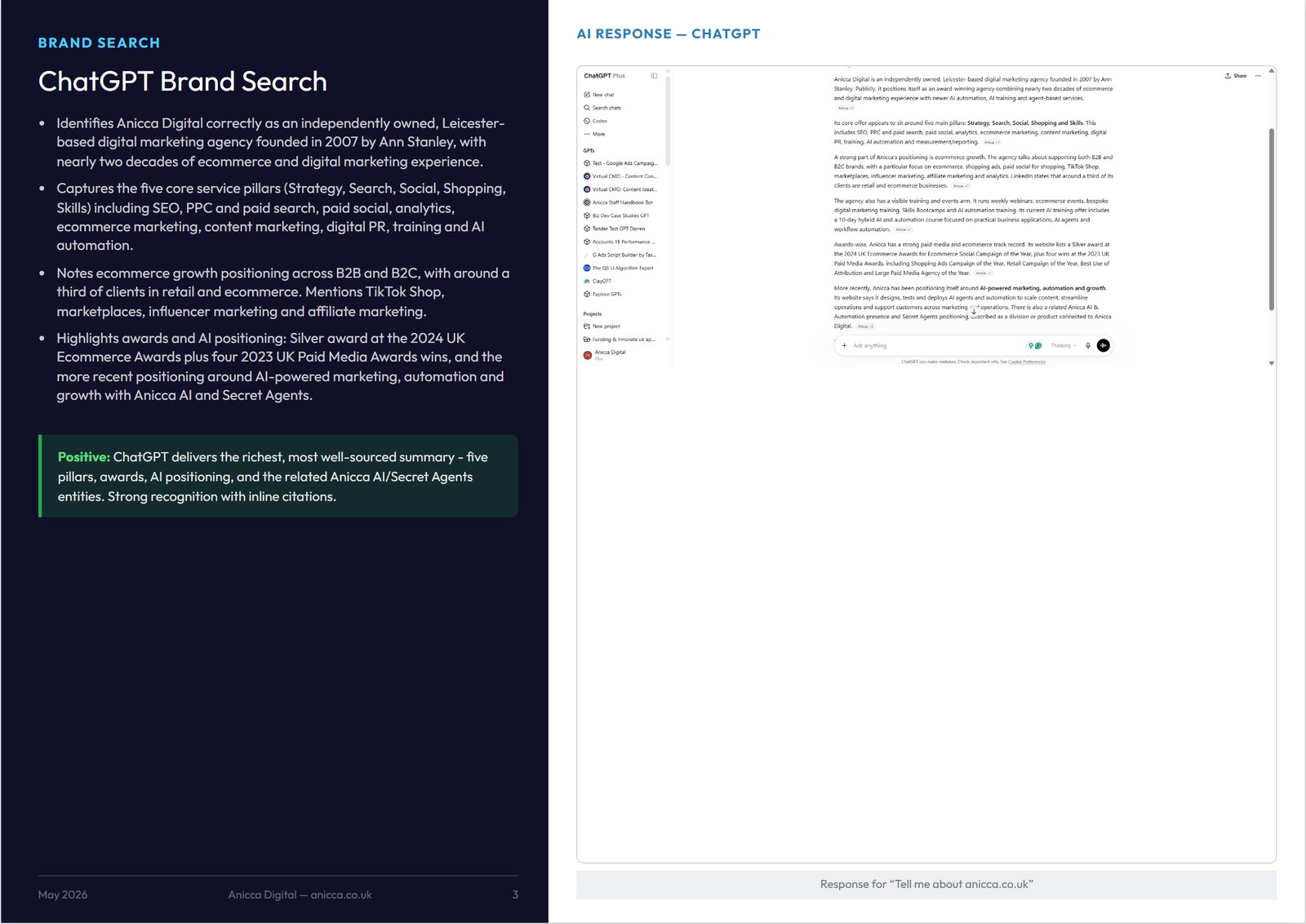
The easiest way to explain what I was collecting is to use the GEO audit we ran on Anicca Digital itself, which covered six topics and came to 53 pages; a typical prospect report covered the brand plus two topics and ran to around 28 pages.
- Brand search on seven AI platforms: we asked ChatGPT, Perplexity, Claude, Gemini, Google AI Overviews, Google AI Mode and Bing Copilot Search the same question, “Tell me about anicca.co.uk”, and screen-shotted each answer. Each page then summarised what that platform got right, what it missed and where it took its information from; for example, Claude and Gemini both explained the Buddhist meaning of the word Anicca, while Perplexity cited our Companies House record.
- AI visibility scores from Waikay (What AI Knows about You) : for the brand and for each topic, Waikay scores how well each AI model knows the business, split into training data (TD, what the model learnt when it was built) and grounded results (GR, what it finds when it searches the web live), across Perplexity’s Sonar, ChatGPT, Gemini and Claude, with the gap to each competitor.
- Four Waikay views per topic: the topic score doughnuts, the score breakdown by AI platform, the Knowledge Map (which shows the facts and subjects the AI associates with you, and the gaps where competitors are known for something you are not), and the Knowledge Sources (how many links each AI model gives to your site and to competitors, plus the percentage of those links that are broken).
- Traffic-light ratings: every score was given a red, amber or green rating using fixed thresholds (green 80 to 100, amber 30 to 79, red 0 to 29), so a business owner could see the problems at a glance.
- Organic search and domain authority: data from the Ahrefs API showed whether a weak AI score was really an SEO problem, because if your site is not doing well in search, AI tools are unlikely to find it either.
- Key findings and recommendations: six or seven colour-coded findings, written by Claude Code from all of the above.
- Content strategy: a recommended content hub for each topic, built from the Knowledge Map gaps, and a buying funnel showing which content to write for each stage of the customer journey.
The pipeline, step by step
Each step became its own Claude Code skill or Python script, with a check before moving on to the next one:
- Set up the Waikay project: the brand, two competitors and two topics (plus a dedicated brand topic), then wait 24 hours for Waikay to collect its data.
- Capture the seven AI platform screenshots: I asked each platform about the brand myself, and a Chrome extension that Claude Code built saved each screenshot with the right file name, such as
screenshot_chatgpt.png, straight into the prospect’s folder. - Capture the Waikay screenshots:
screenshot_waikay_all.pyuses Playwright to log in to Waikay, open each topic and capture the doughnuts, score breakdowns, Knowledge Maps and Knowledge Sources, cropping each one to the right card. - Review the screenshots: Claude Code builds a review page showing every screenshot slot, I approve each one or flag it, and anything flagged is cropped again or recaptured.
- Extract the data:
extract_waikay_data.pypulls the Knowledge Map topics and score tables intowaikay_data.json, and Claude Code reads the scores from the screenshots, which I check against what I can see. - Write the analysis: Claude Code writes the summaries, findings and traffic-light ratings into
analysis_bundle.json, following strict rules about the order of the ratings and what each page should say. - Build the content strategy: the
/content-clusterskill turns the Knowledge Map gap topics into content hub diagrams and buying funnels, saved as HTML and PNG files. - Build and check the report:
build_selected_reports.pyassembles the branded A4 landscape HTML report with every image embedded, andqc_all_reports.pychecks the page count, that every screenshot is present, and that every red, amber or green rating matches the text written about it. - Final review and export: I read through the report in the browser, Claude Code makes any corrections, and the report is exported as a PDF and an editable PowerPoint file.
Everything for one prospect lives in a single folder, so Claude Code always knows where to find each file:
prospects//assets/
├── screenshot_chatgpt.png            one per AI platform (7 in total)
├── brand_overview_1.png              Waikay brand scores
├── topic__1.png to _3.png    score breakdown, Knowledge Map, sources
├── waikay_data.json                  scores, Knowledge Map topics, score tables
├── ahrefs_pull.json                  organic search and domain data
├── analysis_bundle.json              summaries, findings, ratings
├── hub_.png                   content hub diagram
└── funnel_.png                buying funnel diagram
Using Playwright to automate the screen grabs
Playwright is a free browser testing tool that Claude Code uses a lot, because it can open a browser, log in, click through the cookie consent and go to the right page in the same way a person would. We used it to automate what had been the slowest manual task in the report, logging in to Waikay and capturing between 12 and 16 screenshots for every prospect, and to feed the results straight into the analysis.
ChatGPT, Gemini and Claude need you to be logged in, and the AI platforms generally block automated browsers, so the seven brand searches stayed a manual task, sped up by the Chrome extension. That split between what could be fully automated and what still needed a person was a really good lesson in what is and is not possible with these tools.
The time saving, once it was set up
Doing one of these reports by hand would have taken me around four hours, whereas once the pipeline was working I was producing between five and ten reports in about two hours.
If you know you are going to be doing a lot of something, it is worth the effort to set it up. If I had only been doing five, it would have been quicker to do them by hand.
It was not quick to set up, because it was one of the first big things I built with Claude Code. Getting the report to look right, getting our branding in and, above all, training Playwright to capture the right part of the screen took a lot of persistence.
Did the GEO reports bring in work?
Paris asked the obvious question, and I gave him the honest answer: it turned out to be more of a branding exercise than a lead generation exercise.
Of the 70 to 90 brands who received a report, about one in five followed up with a face-to-face meeting, where I took them through it in about an hour. We got in front of some really big brands that I do not think would normally have spoken to us, and when we asked why they had replied to a cold email, they said it was because the email was so well written, with specific details about them and their competitors, that they could see somebody had put real effort into it.
We only got paid work from one of them. If you were doing this purely for lead generation, I do not think I pitched it quite right, and it would need some changes and more follow-up to become a proper lead generation campaign; as much work went into the AI-powered cold outreach as went into the report itself.
What big brands do not understand about GEO
Those 20 or so meetings were really useful, because they told me where businesses are with GEO, and two things came across very strongly.
First, most of them did not really know how AI models find and use information. They did not know the difference between training data and grounded search, or that when an AI tool searches the web it does not use your page as a whole: it breaks content into small passages, known as chunks, and picks out the ones that best match the meaning of the question, often using a vector database (which stores text as numbers that represent its meaning, so passages can be matched on meaning rather than exact keywords). That is quite different from the way most people think about SEO, where a search engine indexes and ranks whole pages, even though many AI tools still use a normal search index such as Bing or Google to find those pages in the first place.
Second, they all had an SEO agency already, or an in-house SEO team, and that was the biggest barrier to a sale. They did not see GEO as different enough from SEO to replace their current agency, so I changed my approach quite early on and started presenting GEO as part of the SEO story.
A few other things stood out:
- The clear layout of the report meant people understood it, which was really good feedback.
- People can tell who knows their stuff: a US software business told us what impressed them was that we genuinely understood how AI models work, and they felt a lot of people selling GEO did not.
- Many brands have never checked what AI says about them. One perfume brand shared its name with a street in Covent Garden, and it was the street being mentioned, not the brand; in other cases the facts were wrong, or the AI was not saying good things about them.
Why GEO measurement is so hard
This is where Paris and I got properly into the detail. You cannot track AI visibility the way you track keyword rankings in SEO, because AI answers are probabilistic: if you run the same prompt ten times you are likely to get ten different answers, and the list of sources the AI cites changes all the time.
AI answers change every time you ask
Rand Fishkin’s research on how much AI answers vary had just started to appear in the press while I was producing the reports, and some of the more knowledgeable brands asked how realistic a report based on 24 hours of data could be.
In the SparkToro study with Patrick O’Donnell of Gumshoe.ai, 600 volunteers ran the same prompts through ChatGPT, Claude and Google’s AI nearly 3,000 times. The same list of brand recommendations came up less than 1% of the time, although how often a brand appeared at all was much more consistent across many runs.
Paris described it as a sampling exercise rather than a precise check, which I think is exactly right. The difference between tools comes down to how many samples they take:
- GEOforge: updates its prompts every seven days, runs every prompt 30 times and shows the margin of error on its charts, which costs more but is honest about how confident you can be in the result.
- Most other tools: cannot afford to do that, because the data is expensive and many of them buy it from the same few sources, so they often check each prompt once a day.
- The prompts themselves: the prompts tools track do not always reflect what real people are asking.
API results are not what people see
Results from the OpenAI API can be very different from what people see in ChatGPT itself. Surfer ran 1,000 prompts through both the apps and the APIs of ChatGPT, Perplexity, Gemini, AI Mode and AI Overviews in August 2026, and found that only 15 to 24% of the brands mentioned were the same in both.
Its conclusion was blunt: “You cannot reliably track your AI visibility based on APIs.” Gemini showed the same gap, citing almost twice as many sources through its API as it did in the app.
Being mentioned is only the start
Even when you can measure it reliably, appearing in an answer is only the start, and there are three things to look at:
- Position: where you appear in the answer will change from one run to the next, so first place today may be fifth tomorrow.
- Mentions and sentiment: mentions will change too, and even when you are mentioned, is the AI actually recommending you, and is the tone positive, neutral or negative?
- Citations: is it your own site being quoted, or another site that is talking about you? Both help awareness, but only one can send people to your site.
So how should you measure GEO?
My view is that GEO is now more of a branding exercise, and measurement should be closer to the way we measure display advertising or social media. The real question is whether it changes awareness or behaviour, so I would track:
- Branded search: are more people searching for your brand name in Google? Search Console shows this month by month.
- Direct visits: are more people typing in your web address and coming straight to your site?
- How leads found you: ask them, because many will say ChatGPT even when analytics shows nothing.
- AI referral traffic and revenue: still worth tracking, but expect the numbers to be small.
What the evidence shows
At BrightonSEO in October, Stijn Bergmans of Follo showed that 80% of his agency’s clients still get less than 1% of their traffic and revenue from AI tools, yet when asked, 45 to 50% of customers say AI played a part. Judging GEO on referral traffic alone will badly undersell it.
Rand Fishkin and Amanda Natividad make the wider case in their new book, Zero Click Marketing, which starts from Amanda’s point that “over half of Google searches end without a click”. AI answers push that even further, because people can get everything they need without ever visiting your site, so being seen, mentioned and remembered matters as much as the visit itself.
We see the same pattern ourselves. We have had an increase in leads in the UK, and a lot of them say they found us through ChatGPT. The traffic from AI tools is tiny, less than 1% of visits, but the leads are good quality, because people have already done their research before they contact us.
Claude Code skills: build it and bottle it
Paris mentioned that most of his team use Claude through the chat and Cowork rather than Claude Code, because Claude Code feels like a tool for developers. I hear that a lot, so I explained how we got into it.
How I got into Claude Code
My journey with Claude started about 18 months ago with Claude Projects. Claude Code was available on a laptop over a year ago, but only through the terminal, the little black box your IT team opens when they are fixing your computer.
I was already vibe coding (building software by describing what you want in plain English) with Bolt and then Cursor, so running Claude Code inside Cursor was not a big step. The big change came in May, when Claude Code arrived in the Claude desktop app and anyone could download it.
What makes Claude Code different
The main thing to understand about Claude Code is that it works with everything on your computer: it can read your files, run Python and JavaScript, and use tools like Playwright for scraping and screenshots.
It connects to your other software (your email, Stripe, your CRM, Google Analytics) through API keys stored in a .env file, which is short for “environment” file and keeps those keys in one place on your own machine. Sometimes it connects through an MCP server instead, a ready-made connector between an AI tool and another piece of software.
I work with one chat per task, and Claude Code keeps a MEMORY.md file that carries what it has learnt from one chat to the next. On a long build such as Armadello, which I have been working on since February, I write a handover and start a fresh chat a couple of times a day, usually after about an hour and a half.
What a skill actually is
For me, the biggest difference has been skills. If you have ever built a custom GPT or a Claude Project, you will know you have a prompt (your instructions) and some files (your templates); a Claude Code skill is a folder containing a SKILL.md instruction file and any templates, but it can also include Python or JavaScript scripts that do the work.
I call my approach “build it and bottle it”: I build something with Claude Code, save it as a skill, use it again, and keep tweaking it until it is right. Sometimes I start from a skill somebody else has built and customise it for our brand and data.
How narrow should a skill be?
Paris asked a really good question: should each skill do one narrow job, or a whole multi-step workflow? My answer is that every skill should be very specific, and then you string them together, which is exactly how the GEO report pipeline above works.
The best example is my weekly blog, which is a set of separate skills that I run in one chat:
| Day | Skill | What it does |
|---|---|---|
| Sunday | /news-scraper | Finds and scrapes the latest articles on AI in marketing and AI news from 25 to 30 sites, using SerpAPI to discover them and Tavily to scrape the full text |
| Sunday | /ai-news-blog-writer | Sorts the articles into categories, writes the blog in the way I have trained it to write, and uploads it to WordPress as a draft |
| Sunday | /blog-image | Creates the branded featured image with the main headlines as bullet points |
| Monday | /ann-linkedin-posts | After I have checked and published the blog (the human in the loop), writes the LinkedIn post in my style |
| Tuesday | /linkedin-newsletter-build | Builds the LinkedIn newsletter, which gets into people’s inboxes in a way that normal LinkedIn posts no longer do |
The whole process takes just over an hour across two days, compared with around four hours by hand, and I have been doing it every week for six months. Without Claude Code I would have given up long ago.
From skills to workflows to AI agents (or commanders)
Paris described his own podcast workflow, which now runs in Grok Bot. Once he stops recording, one agent edits the episode in Descript, publishes it to YouTube and the podcast platforms, writes the show notes, a LinkedIn article and a transcript page, and creates three to five short videos, usually in under an hour; he trained it by giving it the skills he had already built in Claude.
That is very close to what we have been designing in C⁴, our Company Command & Control Centre. If skills are the building blocks, there are three ways to use them:
- Individual skills, customised with your own company brain (the knowledge base that tells the AI how your business works and how you write).
- Workflows, which we build in AI ABC, our Agent Building Canvas, linking skills together in a fixed order, a bit like the n8n automations we built last year, but with AI at each step and the ability to step in.
- Commanders, which work like a head of department: you talk to your head of social media, and it decides which skills and sub-agents to use for each job. I have built 23 commanders so far, each for a specific job title.
I think commanders are where this is heading, and you can see the same idea in Grok Bot, Meta’s Muse and OpenAI’s Dots. The catch is that if you have not built good skills first, your agents will not be very good, in the same way that people who were poor at prompting got poor results from generative AI.
Building skills on your own machine trains the AI to understand how you work, your content and your tone of voice, and you can reuse those skills in whatever tool comes next.
Armadello: why data needs insights and actions
We also talked about the way Claude is now producing dashboards, videos and other things that used to need separate software. Paris’s agency is moving its client reporting from Looker Studio into Claude dashboards, which is exciting, and it is also my biggest worry as someone building software, because the AI companies may build the features you are selling.
So I explained what we do differently with Armadello, the marketing and e-commerce analytics platform we are building at Anicca AI & Insights. My main role for 25 years has been running audits and advising clients across every channel, so I know what data I need to see, and one of my frustrations with GA4 is that you can never get the view you want in the way you could with Universal Analytics.
In Armadello:
- The data is brought in every night by GitHub Actions (scheduled jobs that run automatically from our code repository) into a Supabase database, from GA4, Google Ads, Search Console, e-commerce platforms, CRM systems and more.
- The tables are designed so data from different platforms can be combined, with around 100 pre-built reports plus a dashboard builder.
- Arnie, our AI Analyst, turns the data into insights and recommendations.
- Agencies can see all of their clients in one place and can earn commission if they resell the full package to their clients
- For e-commerce sites it can also run weekly or daily competitor price checks and write product descriptions.
Data without insights is useless, and insights without action are a waste of time.
Paris made a point I agree with completely: experienced marketers still matter, because you need to know which questions to ask, who the dashboard is for, and what story each chart needs to tell.
Thank you to Paris and the GEOforge team for having me on the show.
Get your own GEO report in Armadello
We have now built the GEO report into Armadello, so you can build your own and see how your brand appears in AI search compared with your competitors.
- Sign up for the free Armadello trial and you can build your own GEO report within Armadello.
- The full Armadello package is free until the end of December, then £125 (excl. VAT) a month instead of the usual £250 (excl. VAT), and the GEO dashboard is included, or you can request our full report .
- If you are already one of our clients, you will receive a full GEO report before Christmas.
Start your free trial at armadello.com, or explore the Armadello demo store first; it has nearly all the features and fresh data every day.
Learn Claude Code at the Thursday AI Club
If this episode has made you want to try Claude Code for yourself, the Thursday AI Club is the place to start. It is our live online club for marketers and managers who want to learn by doing, with practical sessions on tools like Claude Code, skills and AI agents, using real marketing work.
Our free guides and webinar recordings are also on the Anicca resources page.
Glossary
- GEO (Generative Engine Optimisation)
- Improving how a brand appears in answers from AI tools such as ChatGPT, Gemini, Perplexity and Google’s AI Overviews.
- LLM (Large Language Model)
- The type of AI model behind tools such as ChatGPT, Claude and Gemini.
- Training data and grounded search
- Training data is what an AI model learnt when it was built. Grounded search is when it looks up fresh information on the web before answering.
- Chunking and vector databases
- Chunking is how AI tools split content into small passages so they can use the most relevant ones in an answer. A vector database stores text as numbers that represent its meaning, so passages can be matched on meaning rather than exact keywords; many AI retrieval systems use one, but not all.
- Zero-click search
- A search where the person gets their answer on the results page or in an AI answer and does not click through to any website.
- Claude Code
- Anthropic’s AI assistant that works on your own computer. It can read and write files, run programs and connect to your other software, and runs in the Claude desktop app or inside editors such as Cursor and VS Code.
- Skill and SKILL.md
- A Claude Code skill is a reusable folder of instructions, templates and, where needed, scripts. SKILL.md is the main instruction file inside it, and you run a skill by typing a slash command such as /blog-image.
- Playwright
- A free browser testing tool that Claude Code can use to open websites, log in and take screenshots, like a person would.
- API and .env file
- An API (Application Programming Interface) is how one piece of software talks to another. The .env (“environment”) file stores the keys that let Claude Code connect to your tools.
- JSON
- A standard text format for structured data. Claude Code writes and reads it for you, which is how each step of the pipeline passes data to the next.
- MCP server
- A ready-made connector that lets an AI tool use another piece of software.
- MEMORY.md and handovers
- MEMORY.md is the file where Claude Code keeps what it has learnt between chats. A handover is a short summary written at the end of a chat so the next one can pick up where it left off.
- GitHub Actions and Supabase
- GitHub Actions runs scheduled jobs from a code repository, such as overnight data imports. Supabase is a hosted database where Armadello stores that data.
- Prompt tracking
- Repeatedly asking AI tools the same questions to see how often a brand is mentioned or recommended.
- C⁴ and commanders
- C⁴ (Company Command & Control Centre) is the AI operating system from Anicca AI & Insights. Commanders are AI agents that work like a head of department, choosing which skills to use for each job.
- Armadello
- The marketing and e-commerce analytics platform from Anicca AI & Insights, with pre-built reports, a dashboard builder and AI insights.