The Marketers & Managers Guide to Building AI Agents with n8n (No Coding Required)
Key Takeaways
- UK businesses are not adopting AI as fast as you might expect. The DSIT UK AI Adoption Survey (2025) found that only 16% are currently using AI, and OpenAI’s own research suggests that among those who do, 80% are still using basic chat rather than automated workflows
- AI agents are not chatbots – they range from semi-autonomous systems with a human in the loop to fully automated workflows, but the key difference is that they trigger, decide, and act across your business tools rather than just generating text in a window
- We have developed a model called the “AI Adoption Ladder”, which allows you to identify where you are in the use of automation and AI. We recommend that you start at level 2-3 (AI-enhanced automations with a human in the loop) rather than trying to jump straight to fully autonomous agents. This will build confidence with your supervised workflows before removing the human checkpoints
- n8n is our preferred platform for building AI automations, though alternatives like Zapier and Make are also available. You can start using n8n for free, upgrade to paid cloud-hosted plans for convenience, or get a techie/developer to install the open-source self-hosted version – 230,000+ users and a $2.5 billion valuation show this is a serious platform
- You do not need to be a developer to start – the Joke Machine example, described below, proves anyone can build a working AI agent in under 10 minutes. The cloud version makes connecting Gmail and other platforms easy, though you will need to learn about credentials and API keys to link other platforms and tools. For more sophisticated automations, code nodes may be needed, but tools like Claude can write those for you
- At Anicca, we run AI agents through our secret-agents.ai platform (triggered by forms that anyone can use) and internally for meeting note transcriptions, weekly blog creation, and automated client reports – this is not experimental, it is how we operate every day
- As you progress up the AI Adoption Ladder, you are likely to use a newer and more interactive type of agents, such as Claude Cowork, Claude Code or Gemini Antigravity (with others being launched on a weekly basis). Building these automations is easier than automated workflows like n8n – as you can describe what you want in plain English (or even by voice) and it writes the code for you. It is also far more powerful than n8n because it can handle day-to-day tasks like managing your files, searching the web, and posting content on your behalf
About This Guide: From ChatGPT to AI Agents and n8n
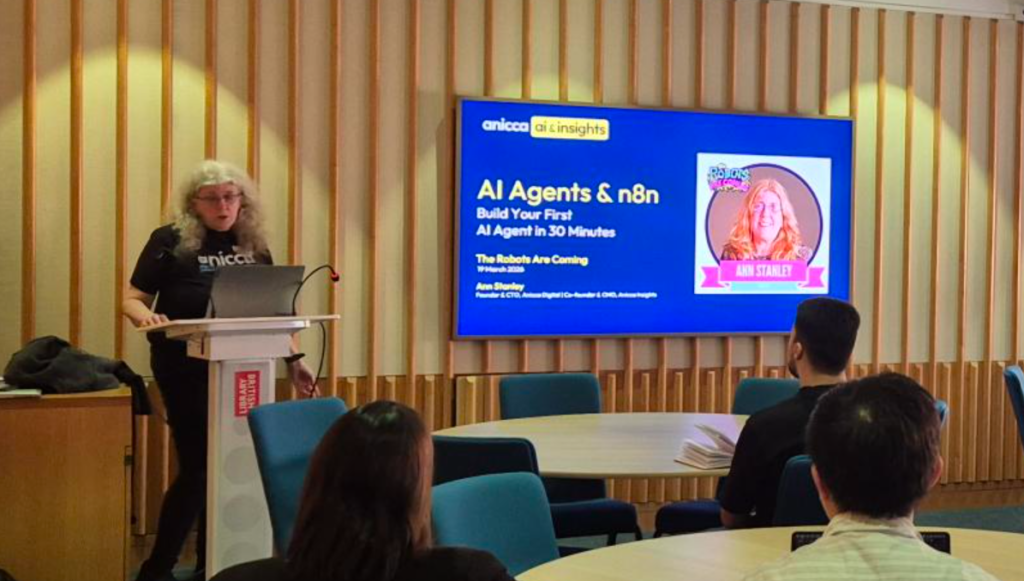
If you have ever copied text from ChatGPT and pasted it into an email, a spreadsheet, or a social media scheduler, you already understand the problem. You are the glue between AI and your business tools. The AI thinks, but you still have to do all the doing – copying, pasting, reformatting, uploading. AI agents change that. They connect the thinking directly to the doing, so the work happens without you sitting in the middle.This guide walks you through what AI agents actually are, how they differ from the chatbots you already use, and how to build your first one using n8n – a visual automation platform that does not require any coding. You do not need to be a developer. I am a marketer, and Anicca’s other director (Darren Wynn) and I have built over 30 AI workflows at our agency without writing a single line of code.I recently gave a workshop on this topic at the Agency Hackers “The Robots Are Coming” conference at the British Library. The audience was agency owners, marketers, and managers – most of whom were regular users of ChatGPT and were building CustomGPTs, but had not yet built anything automated. This article expands on that workshop into the guide I wish I had been given when I started.Most Businesses Are Stuck at ChatGPT
Let me start with a statistic that might surprise you. OpenAI’s own enterprise data from 2025 shows that 80% of business AI usage is still basic chat – people asking questions in a text box and copying the answer into a document. Only 20% of usage flows through custom GPTs or Projects.The UK picture is even more stark. The Department for Science, Innovation and Technology (DSIT) found that only 16% of UK businesses are currently using AI, with a further 5% planning to adopt. Among sole traders, 42% have no plans to adopt AI at all.And yet, among the businesses that have adopted AI, 75% report improved productivity. The gap between “using ChatGPT” and “using AI agents” is where the real gains live. This guide is about crossing that gap.The AI Adoption Ladder
I use a model I call the AI Adoption Ladder to help people understand where they are and where they need to get to. There are five rungs: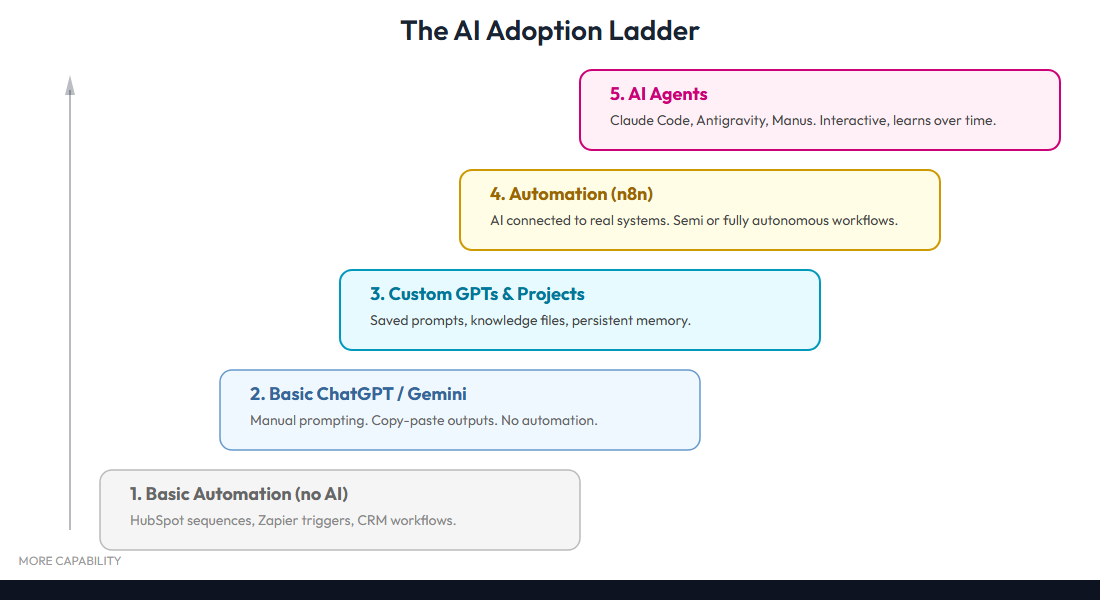
What Is an AI Agent (and What It Is Not)
An AI agent is not a chatbot. A chatbot generates text inside a conversation window. You type, it responds, you type again. An AI agent is fundamentally different: it uses a large language model (an LLM – the technology behind ChatGPT and Claude) to understand inputs, make decisions, use tools, and complete multi-step tasks autonomously.I explain this using what I call the Christmas Cracker model, because every AI agent has three parts that pull apart like a cracker: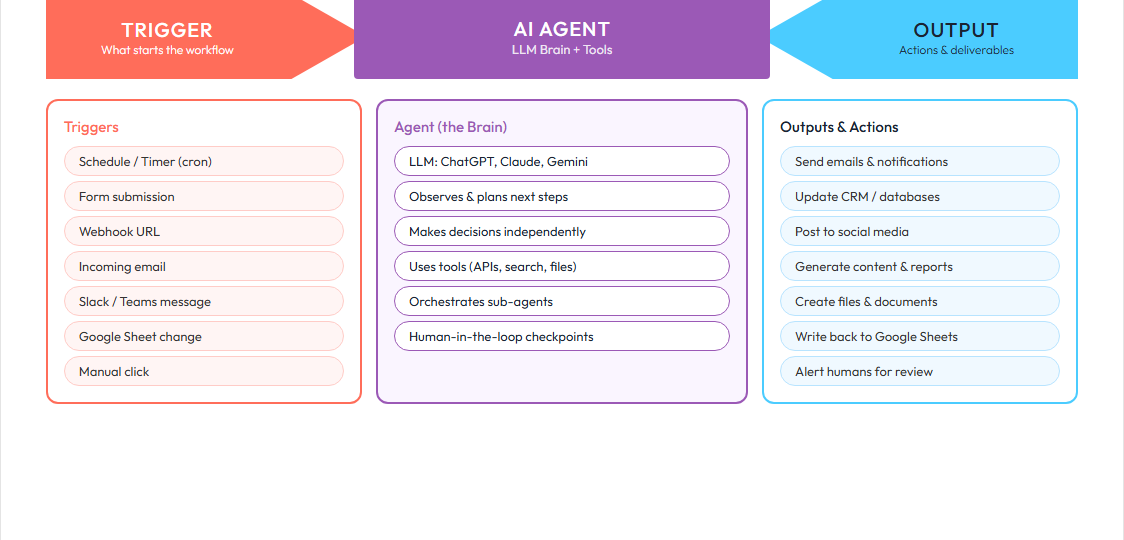
- The Trigger – what starts the process. This could be a form submission, a new email arriving, a scheduled time, or a webhook from another application.
- The Agent – the AI brain that decides what to do. This is the LLM (Claude, GPT, Gemini) processing the information and making decisions.
- The Output – the action the agent takes. Send an email, update a spreadsheet, post to social media, create a document, notify your team on Slack.
The Agent Spectrum: Six Types from Simple to Autonomous
Not all AI agents are the same. I use a spectrum of six types to help people understand the range of what is possible – and where to start: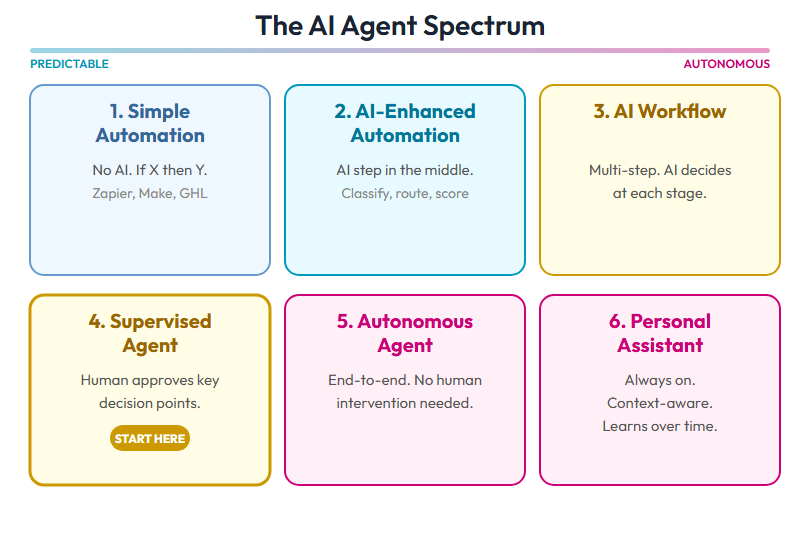
Automation You Already Know: HubSpot, GoHighLevel, and the Limits
If you have used HubSpot, Salesforce, Klaviyo, GoHighLevel, or any CRM with a workflow builder, you have probably built these kinds of automations yourself. Email sequences that fire when a form is submitted, lead scoring rules that move contacts between lists, nurture campaigns that drip content over time. Most of this is built on “if this happens, then do that” logic – classic conditional switching. It works, and it is the foundation that most marketing automation is built on.These platforms have evolved significantly. Many now include their own AI features, built-in integrations, and the ability to connect to third-party tools via webhooks and Zapier. For some businesses, this will be all the automation they ever need, and there is nothing wrong with that.The limitation comes when you want the automation itself to think. Traditional workflows follow the same path every time regardless of context. An AI-powered workflow can read the incoming data, make a judgement call, and adapt its response accordingly. The AI node can analyse a lead’s behaviour, check their company size, read their latest LinkedIn post, and write a genuinely personalised follow-up – all within the same workflow. That is the difference between a sequence and an agent, and it is why platforms like n8n exist.Why n8n? The Tool We Chose
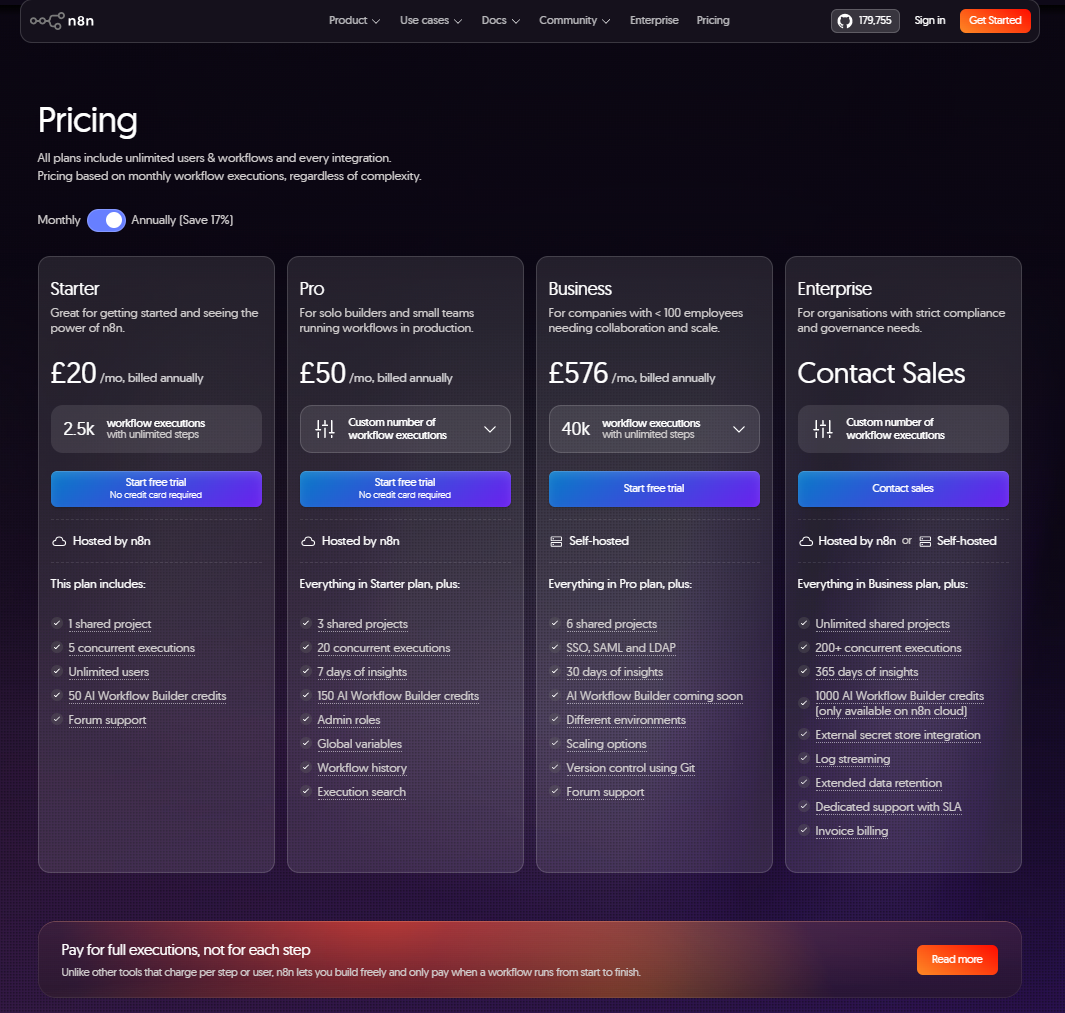
There are several automation platforms available – Zapier, Make (formerly Integromat), and n8n being the three most popular. We chose n8n for our agency work, and here is why: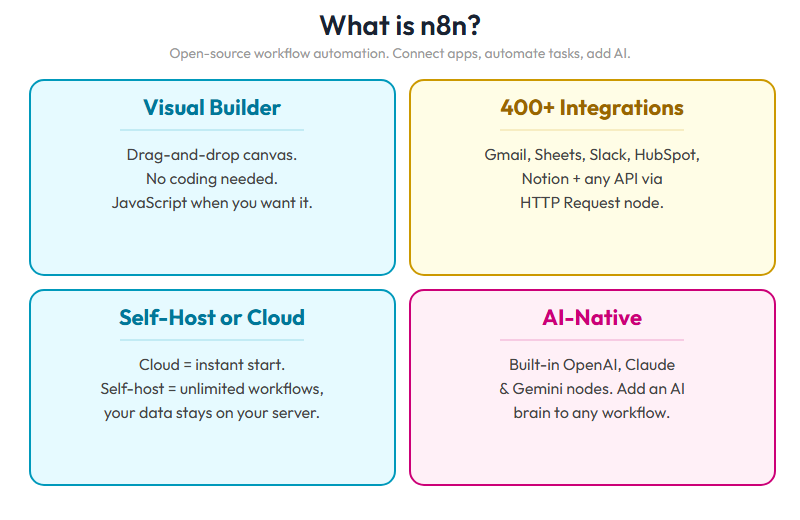
n8n Core Concepts: The Four Building Blocks
Before building anything, you need to understand four concepts. These are the building blocks of every n8n workflow: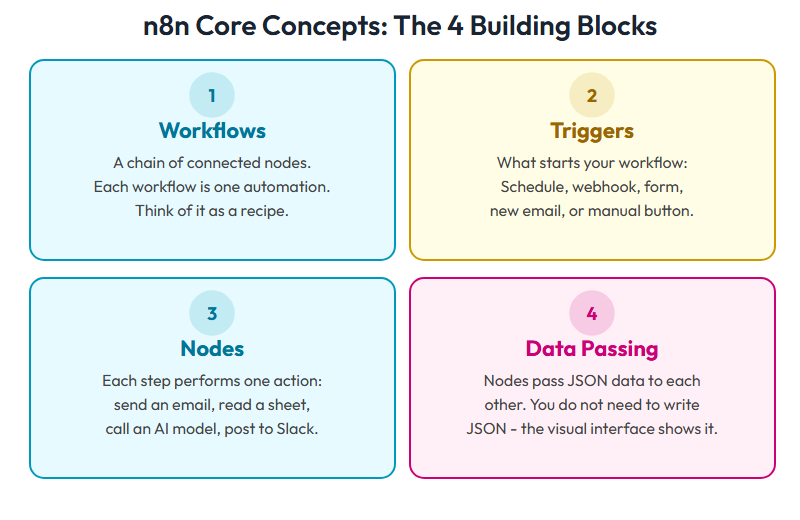
Build Your First Agent: The Joke Machine
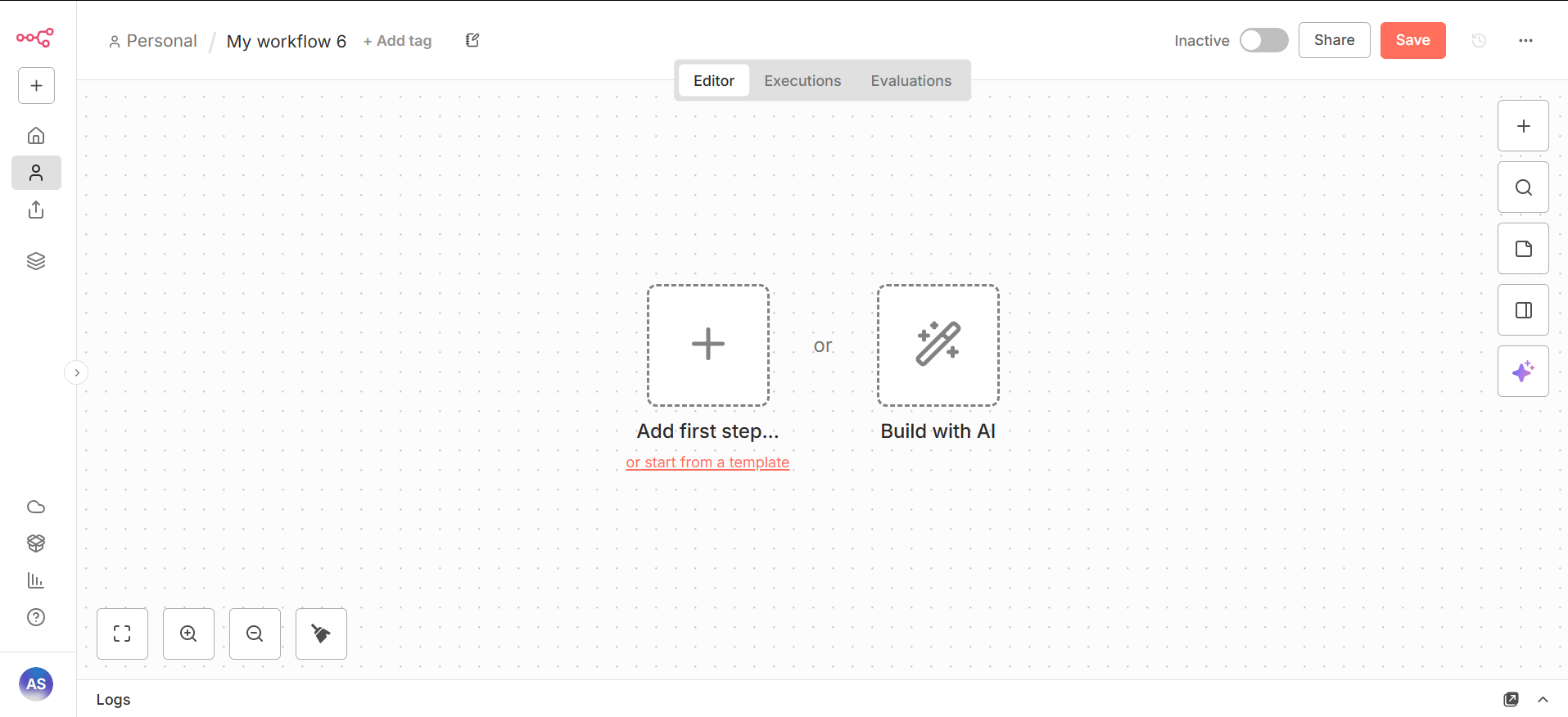
When you sign up to n8n Cloud and log in, this is your workflow dashboard. From here you can create new workflows, manage credentials, and see your execution history.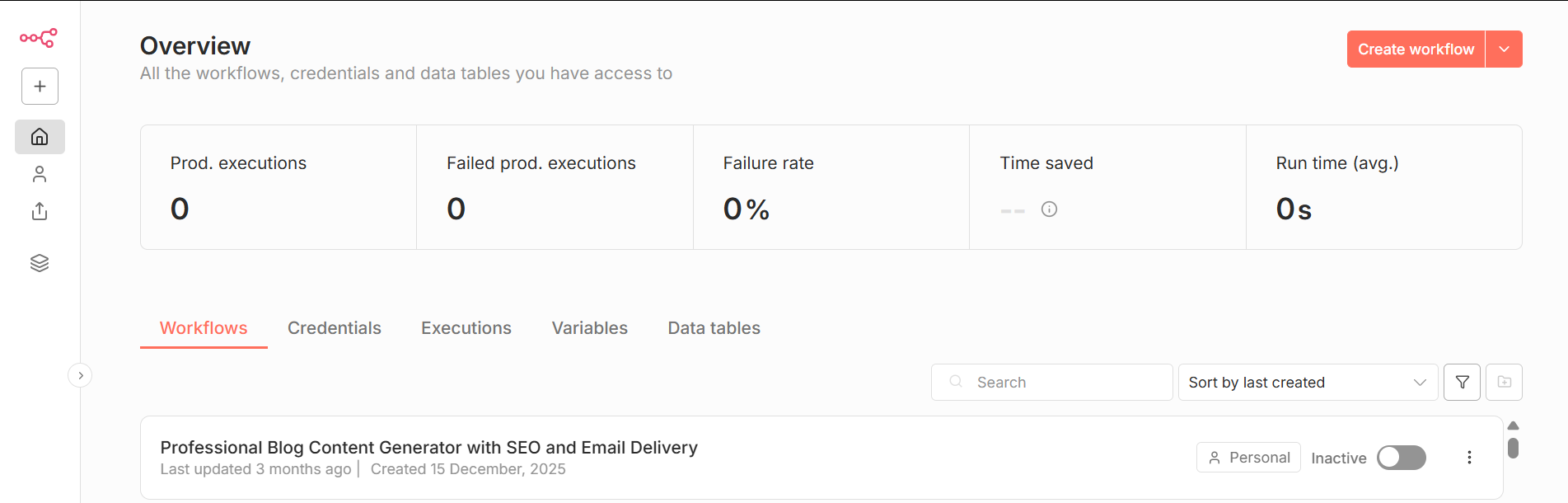
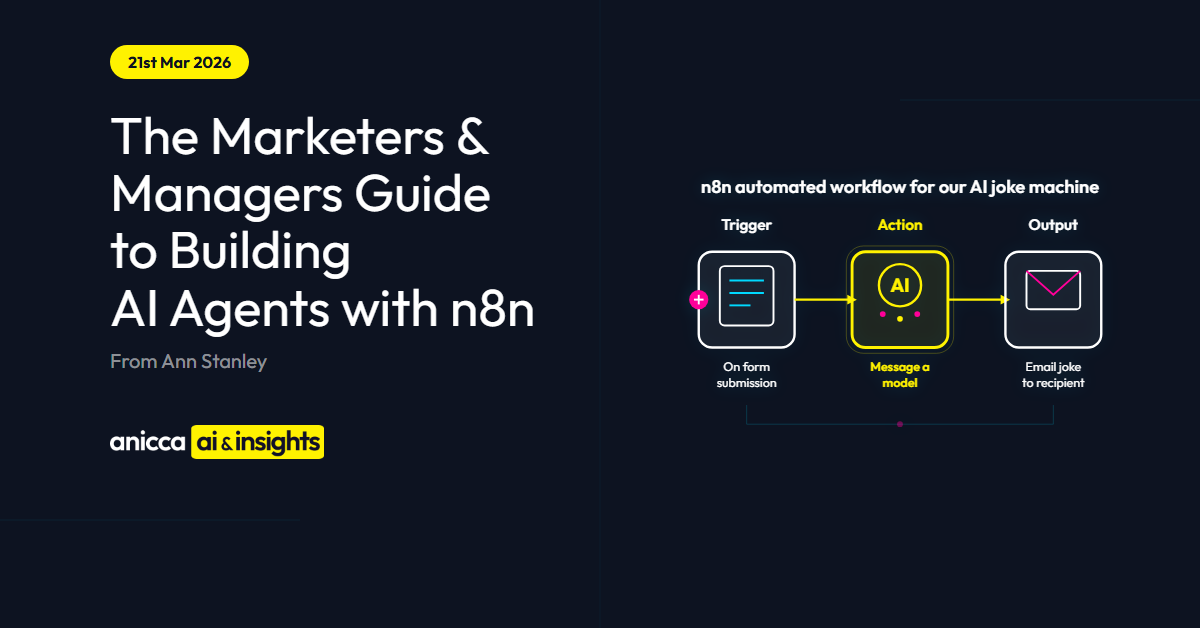
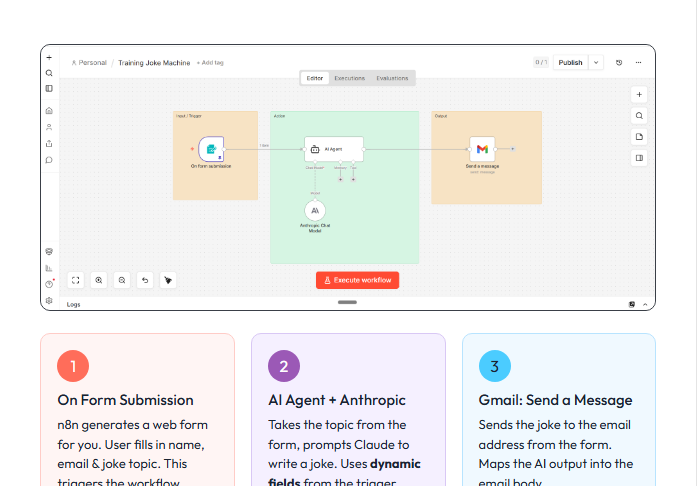 The Joke Machine is a 3-node workflow that takes someone’s name and a topic, generates a personalised joke using AI, and emails it to them. It is simple, but it demonstrates every principle of an AI agent.Node 1: Form Trigger. n8n has a built-in form node that creates a simple web form. Ours asked for three things: the person’s name, email address (so we know where to send the joke) and a topic they wanted a joke about. When someone submits the form, the workflow starts.Node 2: AI Agent (Anthropic Chat Model). This node takes the name and topic from the form and sends them to Claude with a prompt: “Generate a short, corny personalised joke for [name] about [topic], in the style of Billy Connolly.”
Claude generates the joke and passes it to the next node.Ann, a dog walks into a bar. The barman says “We don’t serve dogs in here.” The dog says “That’s fine, I’ll have a pint of lager. I don’t eat dogs either.”Node 3: Gmail. The final node takes the generated joke and sends it by email to the person who submitted the form. Subject line, body text, and recipient are all pulled automatically from the previous nodes.
The Joke Machine is a 3-node workflow that takes someone’s name and a topic, generates a personalised joke using AI, and emails it to them. It is simple, but it demonstrates every principle of an AI agent.Node 1: Form Trigger. n8n has a built-in form node that creates a simple web form. Ours asked for three things: the person’s name, email address (so we know where to send the joke) and a topic they wanted a joke about. When someone submits the form, the workflow starts.Node 2: AI Agent (Anthropic Chat Model). This node takes the name and topic from the form and sends them to Claude with a prompt: “Generate a short, corny personalised joke for [name] about [topic], in the style of Billy Connolly.”
Claude generates the joke and passes it to the next node.Ann, a dog walks into a bar. The barman says “We don’t serve dogs in here.” The dog says “That’s fine, I’ll have a pint of lager. I don’t eat dogs either.”Node 3: Gmail. The final node takes the generated joke and sends it by email to the person who submitted the form. Subject line, body text, and recipient are all pulled automatically from the previous nodes.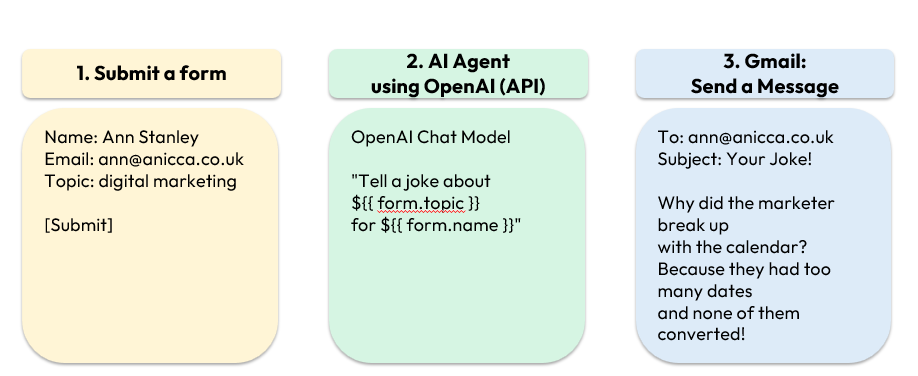
Real Business Workflows You Could Create Now
The Joke Machine proves the concept. Here is what it looks like when you apply the same principles to real marketing work: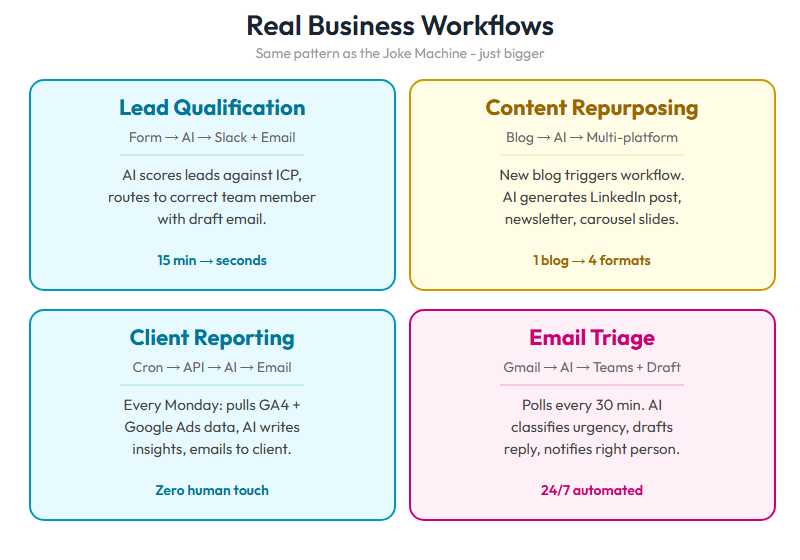
The Christmas Cracker Model: Thinking About AI Employees
Once you have built a few workflows, the bigger picture starts to emerge. I use the Christmas Cracker model to explain how AI agents become the equivalent of AI employees in your business: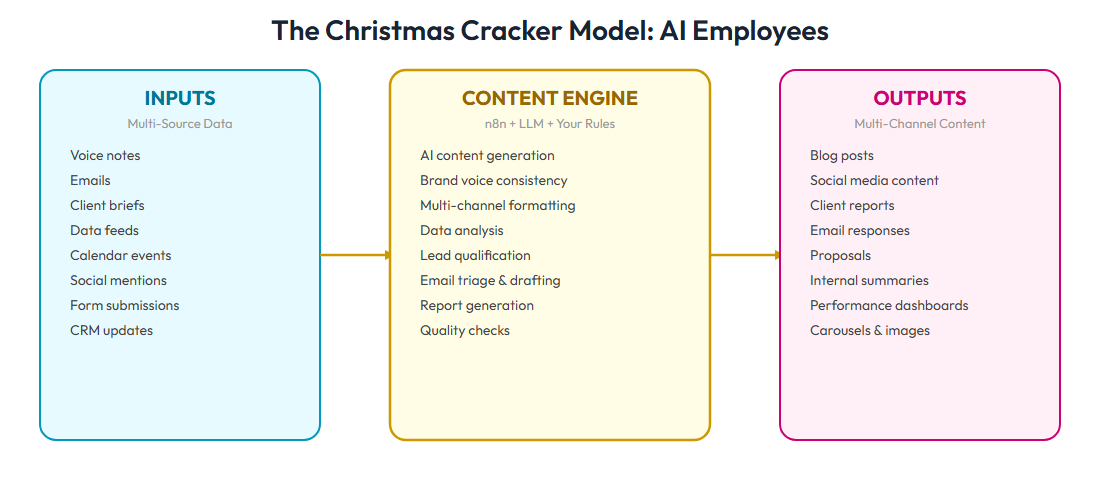
The 10 Nodes That Cover 80% of Use Cases
n8n has hundreds of nodes, but you do not need to learn them all. These 10 will cover the vast majority of what marketers and managers need to build: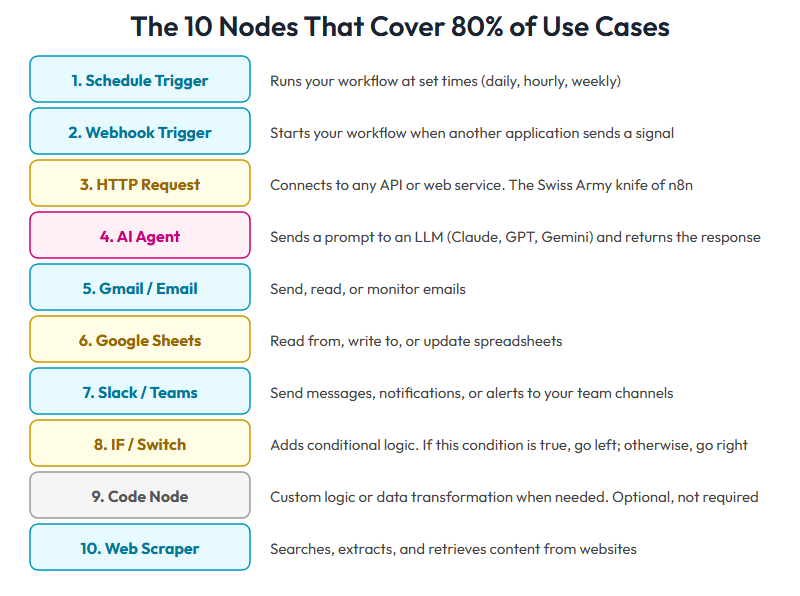
Nodes that help in the creation of content and marketing assets
- Document handling Many of our workflows involve creating or processing documents – meeting transcriptions, proposals, first drafts, client reports. The Extract Content node lets you pull text from uploaded files such as PDFs and Word documents so the AI can read and work with the contents. On the output side, binary file nodes allow you to create downloadable documents from your workflow’s results. Between the two, you can build workflows that take a raw document in, process it through AI, and produce a finished file at the other end.
- Image Creation. Recent models from ChatGPT and Gemini’s Nano Banana have significantly improved the ability to generate and edit images within an automated workflow. In practice, we find it more reliable to start with a branded template and ask the AI to edit it rather than generating images from scratch, as prompting for visual output within an n8n workflow can be unpredictable.This does introduce some technical steps. Image editing and image generation use different API endpoints (the URL that connects your workflow to the AI service). For example, when creating a carousel, an ad, or a blog featured image, we use ChatGPT’s image edit endpoint and pass it variables from the workflow – the blog title, the category, the author name – so it knows what to change on the template. The output comes back as a base64 string (a long block of encoded text rather than a visible image), so you need an additional node to convert that into a PNG file and save it somewhere you can actually use it.
- HTML Display. Most automations produce their output as raw JSON data or plain Markdown text, neither of which is easy to read or present to a client. The HTML node lets you take that raw output and format it into a clean, styled page – whether that is a generated report, a blog draft for review, or a preview of the image you just created. We use this node in almost every workflow because it turns something that looks like code into something a human can actually read and act on.
When You Need Technical Support
You can build a lot with n8n without any technical help, but there are areas where a developer or someone more technical adds real value:- Setting up the self-hosted open-source version on your own server
- Running workflows as background processes that start automatically when the server boots
- Configuring direct integrations with your email system or CRM at the API level rather than through pre-built nodes
- Locking down access controls, SSL certificates, and security compliance when handling sensitive client data
- Setting up error monitoring and alerts so you know immediately when a workflow fails rather than discovering it days later
- Building user authentication, billing integration, and scalable infrastructure if you want to turn a workflow into a product or SaaS offering
Beyond n8n: When Visual Automation Is Not Enough
n8n is powerful, but it has a ceiling. Visual drag-and-drop workflows are perfect for defined, repeatable processes – lead routing, content scheduling, email triage, reporting. But there are tasks that need more flexibility.When you need AI that does not just connect existing tools but creates new ones – building a bespoke client report from scratch, generating a 40-page audit with custom charts, or creating an interactive portal – that is where conversational AI agents come in.This is not about choosing one or the other. At Anicca, we use both:- n8n for defined, repeatable workflows (email triage, lead scoring, content distribution, reporting)
- Conversational AI agents for open-ended, creative work (building audit reports, generating proposals, creating client tools)
Understanding the Claude Ecosystem: Seven Levels of Capability
For those ready to go beyond n8n, or who want to understand where the technology is heading, here is how I explain the Claude ecosystem. It has seven levels, each building on the last: 1. Claude Chat. The starting point. Conversational AI – you ask questions, it answers. Similar to ChatGPT but with different strengths (particularly in long-form content, reasoning, and following complex instructions).
 2. Claude Projects. You can create saved workspaces with custom instructions and uploaded documents. This is like giving Claude a permanent briefing document about your business, your brand voice, or your industry.
 3. Claude Artifacts. Claude can generate documents, code, visualisations, and interactive content directly in the conversation. Not just text – actual usable outputs.
 4. Claude MCP (Model Context Protocol). This is where it gets interesting. MCP lets you connect Claude to external tools and services – browsers, calendars, databases, APIs. Claude can interact with your local files, not just generate text.
 5. Claude Code. A conversational AI agent that can read your entire codebase, write and edit files, run commands, and make changes across multiple files. It is like having an AI developer working alongside you.
 6. Claude Skills. Reusable packages of instructions, scripts, and resources that Claude Code can learn. At Anicca, we have built over 80 skills – from generating SEO audits, to building competitor intelligence decks. Each skill is a capability the AI permanently knows how to perform.
 7. Claude Channels and OpenClaw.
Claude Channels launched this week (March 2026) as Anthropic’s platform for connecting Claude Code to messaging apps like Telegram and Discord, so you can trigger agents and receive results directly in the tools your team already uses.It is Anthropic’s answer to OpenClaw, the open-source AI agent that went viral in early 2026 by letting you message an AI assistant through WhatsApp, Slack, Teams, and more – it runs on your own machine and can read files, browse the web, send emails, and automate tasks across your applications.OpenClaw remains the most widely adopted option with over 200,000 GitHub stars, but its open nature and the broad permissions it requires have raised significant security concerns. Claude Channels offers a more controlled alternative with Anthropic’s safety and security standards built in. Expect this space to change rapidly as every major AI company is building their own version.
7. Claude Channels and OpenClaw.
Claude Channels launched this week (March 2026) as Anthropic’s platform for connecting Claude Code to messaging apps like Telegram and Discord, so you can trigger agents and receive results directly in the tools your team already uses.It is Anthropic’s answer to OpenClaw, the open-source AI agent that went viral in early 2026 by letting you message an AI assistant through WhatsApp, Slack, Teams, and more – it runs on your own machine and can read files, browse the web, send emails, and automate tasks across your applications.OpenClaw remains the most widely adopted option with over 200,000 GitHub stars, but its open nature and the broad permissions it requires have raised significant security concerns. Claude Channels offers a more controlled alternative with Anthropic’s safety and security standards built in. Expect this space to change rapidly as every major AI company is building their own version.Getting Started: Your Next Three Steps
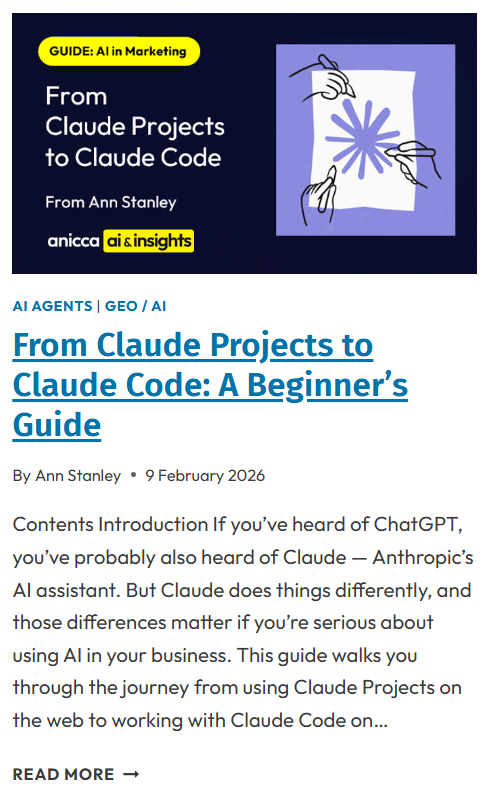
You do not need to go to level 7 of the Claude capability ecosystem to get value. Many businesses will find enormous benefit at levels 1-4. But knowing the full landscape helps you plan where to invest your time and training.If this guide has convinced you to move beyond basic ChatGPT usage, here are the three things I would recommend doing this week:1. Try n8n. Sign up for the free cloud tier at n8n.io and build the Joke Machine. It will take you less than 30 minutes, and you will understand every principle in this article by doing it.2. Pick one workflow to automate. Look at your week and identify one task that is repetitive, structured, and involves moving information between systems. Lead notifications, content distribution, or weekly reporting are good starting points. Build it in n8n.3. Join the Thursday AI Club. We run fortnightly sessions where marketers and agency owners learn to build AI agents hands-on. Visit anicca.co.uk/thursday-ai-club to find out more.For further reading, these guides go deeper into the Claude ecosystem:- From Claude Projects to Claude Code: A Beginner’s Guide
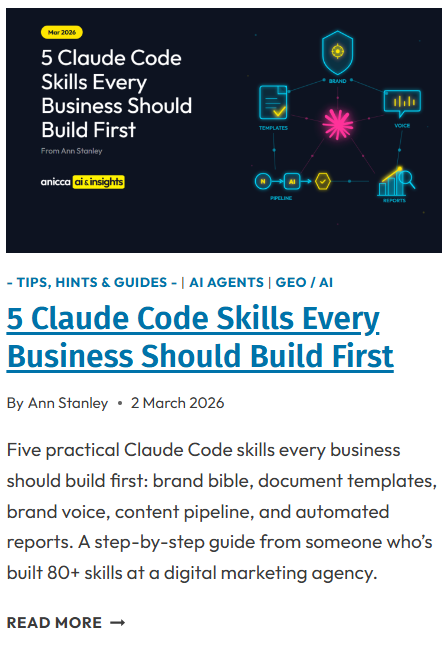
- 5 Claude Code Skills Every Business Should Build First
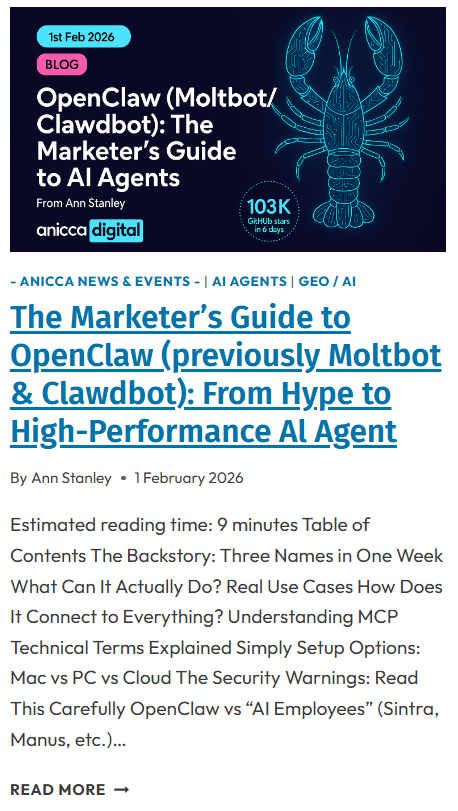
- The Marketer’s Guide to OpenClaw
- Claude Just Got Marketplace, Dispatch and Code Channels in 7 Days – What It Means for Your Business
Frequently Asked Questions
Do I need coding skills to use n8n?
No. n8n is a visual drag-and-drop platform. You build workflows by connecting nodes on a canvas, not by writing code. There is an optional Code node for advanced users, but it is not required for the vast majority of workflows.Is n8n free?
n8n has a free self-hosted option where you run it on your own server (as little as £5 per month for hosting). The cloud-hosted version starts at $20 per month. Compared to Zapier, which charges $69+ per month for equivalent functionality, n8n is significantly more cost-effective at scale.What is the difference between n8n and Zapier?
Zapier is easier for absolute beginners and has more pre-built integrations (8,000+). n8n has fewer integrations (400+) but treats AI as a core feature rather than just another connection. n8n also offers self-hosting for data privacy and is substantially cheaper at scale. For agencies handling client data, the self-hosting option is often the deciding factor.What is an LLM and why does it matter?
LLM stands for Large Language Model. It is the technology that powers ChatGPT, Claude, and Gemini. These models have been trained on vast amounts of text and can understand, generate, and reason about human language. In n8n, you use LLMs as the “brain” of your AI agents – the node that reads inputs, makes decisions, and generates outputs.Can I use n8n with client data safely?
Yes. n8n’s self-hosting option means you can run everything on your own infrastructure. Client data never passes through a third-party server. This is one of the primary reasons agencies choose n8n over cloud-only alternatives. You control where the data lives and who has access to it.What is Claude Code and how is it different from n8n?
n8n is a visual automation platform for connecting existing tools and building repeatable workflows. Claude Code is an AI agent that can read your codebase, write files, run commands, and build entirely new tools and systems. Think of n8n as connecting the plumbing between your apps, and Claude Code as the architect that designs and builds new rooms. Most agencies start with n8n and graduate to Claude Code as their ambitions grow.Glossary
- AI Agent – an autonomous system that uses an LLM to perceive inputs, make decisions, and take actions without constant human guidance. Different from a chatbot, which only responds when prompted
- AI Adoption Ladder – a five-rung framework for understanding where a business sits in its AI journey, from not using AI at all (rung 1) to deploying autonomous agents (rung 5)
- Anthropic – the AI company that makes Claude. Founded by former OpenAI researchers, headquartered in San Francisco
- API (Application Programming Interface) – a way for two software applications to talk to each other. When n8n connects to Google Sheets, it uses Google’s API. You do not need to understand the technical details – n8n handles the connection for you
- Automation – making a process run without manual intervention. Email sequences in HubSpot are automation. n8n workflows are automation. The difference is that n8n can add AI intelligence to the process
- Christmas Cracker Model – Ann Stanley’s framework for explaining AI agents: every agent has a Trigger (what starts it), an Agent (the AI brain), and an Output (the action it takes)
- Claude – Anthropic’s AI assistant, used in the n8n AI Agent node. Known for strong performance in long-form content, complex reasoning, and following detailed instructions
- Claude Code – a command-line AI agent from Anthropic that can read your entire codebase, write and edit files, run commands, and build new tools. The next level beyond visual automation
- Context Window – the amount of information an LLM can hold in memory during a single interaction. A larger context window means the AI can work with longer documents and more complex tasks
- JSON (JavaScript Object Notation) – the data format used to pass information between nodes in n8n. You do not need to write JSON – n8n displays it visually – but knowing it exists helps when debugging workflows
- LLM (Large Language Model) – the technology behind ChatGPT, Claude, and Gemini. A type of AI trained on enormous amounts of text that can understand, generate, and reason about human language
- MCP (Model Context Protocol) – a way to connect Claude to external tools and services such as browsers, calendars, and databases. It allows the AI to interact with real-world systems, not just generate text
- n8n – an open-source workflow automation platform (pronounced “n-eight-n”). Lets you build automated workflows by visually connecting nodes on a canvas. Has 230,000+ users and a $2.5 billion valuation
- Node – a single step in an n8n workflow. Each node performs one action: send an email, read a spreadsheet, call an AI model, or post a message. You connect nodes to build workflows
- No-Code – building software or automations without writing programming code, using visual interfaces instead. n8n is a no-code platform
- OpenClaw – an open-source marketplace for sharing and discovering Claude Code skills. Like an app store for AI agent capabilities
- Prompt – the instructions you give to an AI model. In n8n, you write a prompt inside the AI Agent node to tell Claude or GPT what to do with the incoming data
- Self-Hosting – running software on your own server rather than using someone else’s cloud. n8n can be self-hosted, meaning your data stays on your infrastructure
- Skills (Claude Code) – reusable packages of instructions, scripts, and resources that Claude Code can learn and perform repeatedly. Each skill is a permanent capability
- Trigger – the first node in an n8n workflow that starts the process. Can be a schedule, a webhook, a form submission, a new email, or a manual button press
- Webhook – a way for one application to send real-time data to another when an event occurs. In n8n, a webhook trigger starts your workflow when an external app sends it a signal
- Workflow – a series of connected nodes in n8n that automate a process from start to finish. The equivalent of a recipe: trigger, steps, output

Thursday AI Club
A hands-on AI club for marketers and managers. Fortnightly 3-hour sessions: Hour 1 is an open Q&A on any AI question; Hours 2-3 split into a workshop track (for newbies) and an advanced track (live demos and deeper questions).
Led by Ann Stanley, James Allen.
Workshop recordings library
Skills and prompts to copy
Private community channel
Secret Agents community access
Full-day hackathon every quarter
Cancel any time
Membership: £40/month or £400/year
Join the Thursday AI Club →